Is a Silhouette Cameo an Alternative to Cricut?

Desktop cutters has become popular among crafters. The Silhouette Cameo is an alternative to the Cricut machine and has some features that make it stand out.

The Silhouette Cameo cuts through paper, plastic, vinyl, and fabric with ease. The machine does not need any cartridges or software to cut anything. The only thing you need to do is load the design into the machine and start cutting!
You can use the Silhouette Cameo for scrapbooking, card making, invitations, home decorating projects, sewing projects and much more!

What Is the Difference Between the Silhouette Cameo and Cricut?


There are many differences between the machines but what makes the Silhouette Cameo an alternative to the poplar cricut?
The Silhouette Cameo is an all-in-one machine that cuts, embosses, and engraves. The Cricut is a standalone cutting machine with its own design software.

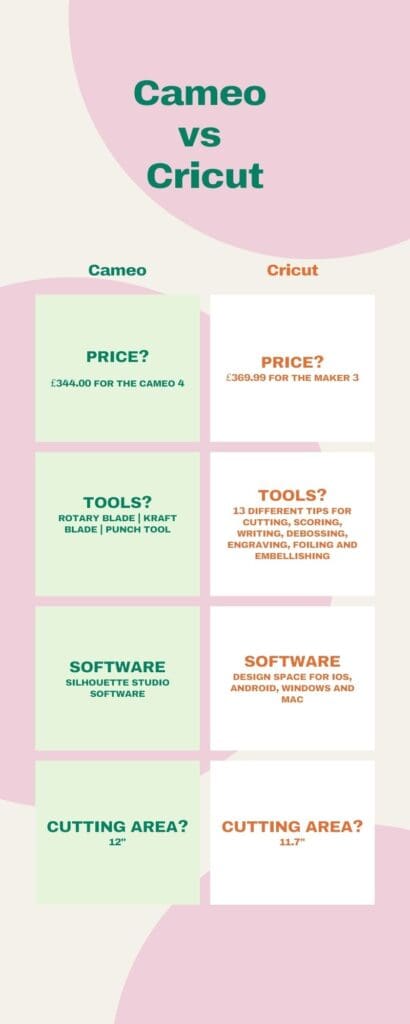
The Silhouette Cameo 4 Pro is available from Signmaster and can cut materials up to 12 inches wide while the Cricut can cut materials up to 11.7 inches wide. The Cricut also has more blade options for different materials than the Silhouette Cameo does.


How to Choose Which Brand of Cutting Machine is Best for You
Choosing the right cutting machine is a decision that you need to make carefully. There are many different brands of cutting machines on the market, and they all have their own unique features. The cost of these machines can vary significantly, so it is important to make sure that you choose a machine that fits your budget.
Take a look at this comparison table between the cameo and the cricut, to help you make the best choice for your needs
How to Use Your New Cutting Machine.
A cutting machine is a device that cuts material using a blade or a variety of different tools. Cutting machines having become increasing more popular with hobby crafters and diy makers, as the technology has become more affordable.
The first step to using your new cutting machine is to read the manual. Make sure you understand how to operate it and what safety precautions you need to take before you start cutting materials.
Explore the options available and dont be afraid to experiment. Keep in mind that the first projects will probably be failures, but don’t let that put you off. I know whichever machine you’ll pick, hours of crafting time to enjoy will be yours!