Drive traffic to your blog using fresh pins

If you are a blogger than you will know what a valuable tool pinterest can be for driving traffic to you blog. For mine it accounts for nearly half of all traffic. It is vitally important that I maintain this level, which is why I use Tailwind to help me schedule my content and create a steady flow of pins throughout the day. This is how I quickly and easily drive traffic to my blog using fresh pins.
This post contains affiliate links, meaning that if you choose to click through and make a purchase, I will receive a small commission at no cost to you. I was also compensated to create this post, though all opinions are my own.
What is Tailwind?
Tailwind is a scheduling tool for Pinterest that allows you to upload content for your pinterest account and then schedule when they will get pinned. Meaning you can batch your work and save considerable amounts of time by not manually pinning throughout the day. It can also suggest the best times to pin, allow you to join tribes to promote your pins and even re-pin evergreen content using smart loop. It can also stop you from being shadowbanned by Pinterest by using the new tool SmartGuide.
Tailwind costs $15.00 a month or $119 if paid annually. You can get your first month free here. Tribe functionality and smart loops can be purchased through power ups.

What is SmartGuide?
SmartGuide is a Tailwind feature that makes sure you stay within Pinterests best practices. The main focus of Pinterests best practices being the promotion of fresh content. SmartGuide monitors your pinning and alerts you if what you are pinning or the frequency that you are pinning will cause you to reduce your reach or be flagged as spam.
It then can make suggestions on how to make sure you have a healthy queue of scheduled pins. Once you stick to these suggestions you’ll see the all clear symbol above your schedule.

What is fresh content
So what is classed as fresh content? Pinterest is a search engine and what drives it is new content, so having boards filled with exactly the same pin, with the same image and text is not going to look good. Fresh content can be created for old blog posts and multiple pins can be created for each of them. They just need to vary enough in style and imagery. So that they can be classed as fresh. Simple moving your logo from one corner to another, doesn’t make it fresh.
Here are three examples I made for this post:



You can see how I’ve used different combinations of images, layout and text, but they will all be driving views to this one post.
How to create fresh pins quickly
If the thought of having to make all new pins for your old content is making you groan inside. I know how you feel, but I have recently discovered a new tool that has been a game changer for me and my pinning. Not only does it help me create great looking pins, but I can make 100 new pins in under an hour. Meaning I cut down of the time creating and with Tailwind I cut down on the time scheduling.
Seem to good to be true? It almost is. I had long been a user of Canva but wasn’t prepared to pay for all the extra features monthly. So I used the free plan. Now I am a convert to RelayThat. For a one off payment of $49.00 I have lifetime use of this design tool. It is so easy to use, it comes masses of pin templates ready for you to drop you photos into and customise the colours and fonts. You can also create other social media images, but my main use is for Pins.
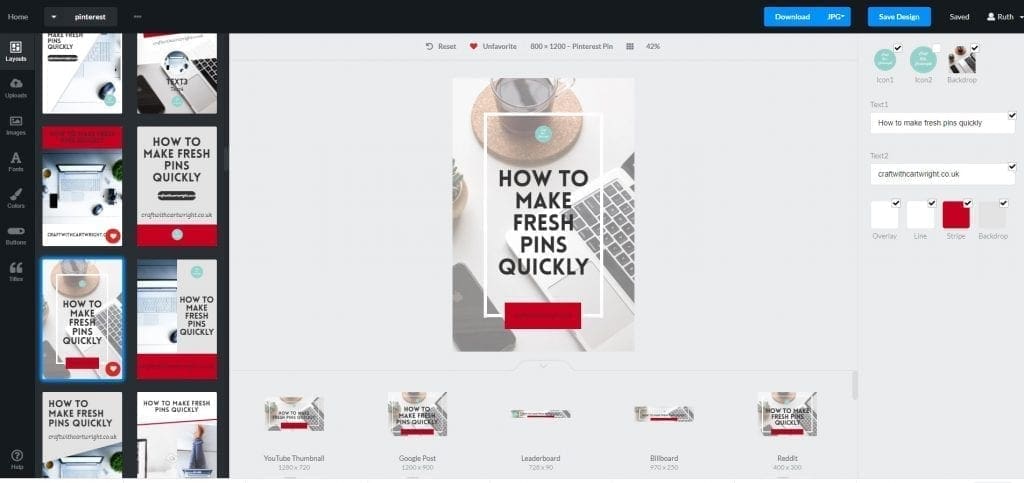
You can get the RelayThat deal via appsumo, saving you $1,151.
Drive traffic
Very simply these two tools have cut down on my workload and are helping me drive considerable amounts of traffic to my site daily. Just look at these stats for just one of my pins. Obviously these are my personal results, but Tailwind also publishes the Typical Results of Tailwind Members every year, so you can see exactly what the average growth rate looks like for their members.

Don’t miss out on the chance to trial Tailwind and can get your first month free here.
Liked Drive traffic to your blog using fresh pins?
You’ll love
5 quick ways to beat the instagram algorithm

15 effective ways to promote your blog content on Facebook

Changing from blogger to influencer; What’s the difference?