Free pencils and crayons SVG cut file

Crafting with a cutting machine opens up a world of possibilities. I love creating unique and personalized items. So I’m sharing a special freebie ready for back to school: a set of pencils and crayons SVG cut files. These versatile designs can be used in various projects, adding a creative touch to your crafting.

Why SVG Files Are Essential for Cricut Users
SVG files, or Scalable Vector Graphics, are perfect for Cricut projects. Unlike raster images, vector graphics can be resized without losing quality. This means you can scale your designs to fit any project, from small stickers to large wall decals. Plus, SVG files are easy to manipulate in Cricut Design Space, making them a go-to for any Cricut user.
How to Download and Use the Free Pencils and Crayons SVG Cut File
To download the free pencils and crayons SVG cut file, simply sign up for exclusive access. By joining, you’ll also get access to other free SVG files, project ideas, and crafting tips. This is a great way to stay inspired and keep your Cricut projects fresh and exciting.

- Download the SVG File: After signing up, download the SVG file to your computer.
- Upload to Cricut Design Space: Open Cricut Design Space and upload the SVG file. You’ll see the set of pencils and crayons appear on your canvas. From here, you can adjust the size and placement as needed.
- Customize Your Design: One of the best things about SVG files is their flexibility. You can customize the colors, add text, or combine with other designs to create something unique. Cricut Design Space allows for easy customization, so don’t hesitate to experiment.
- Cut Your Design: Once satisfied with your design, select the appropriate material settings and let your Cricut machine do the cutting. Whether you’re using vinyl, cardstock, or another material, the machine will handle it with precision.
Creative Ways to Use the Pencils and Crayons SVG Cut File
The possibilities with this set of SVG files are endless. Here are some ideas to get you started:
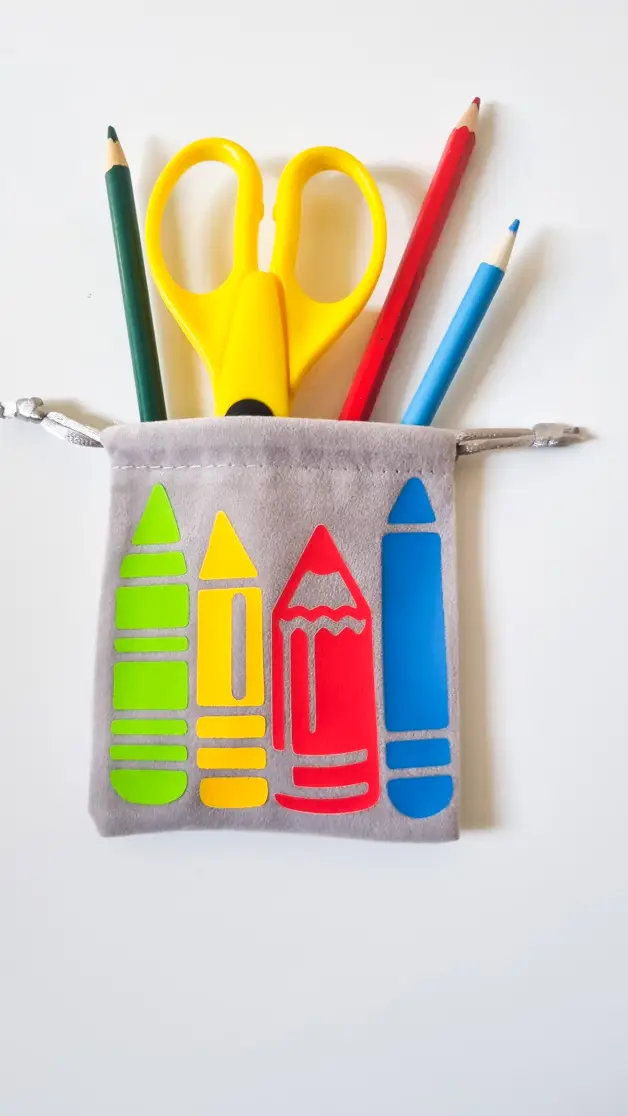
- Classroom Decor: Create colorful wall decals for a classroom. The pencil and crayon designs are perfect for an educational environment. Use vinyl to make durable and vibrant decorations that can easily be applied to walls, windows, or bulletin boards.
- Personalized Stationery: Make custom notebooks, planners, or bookmarks. The SVG files can be used to create unique stationery items, making great gifts for teachers, students, or anyone who loves to write and draw.
- Party Decorations: Planning a birthday party or a school event? Use the pencil and crayon designs to create themed decorations. From banners to cupcake toppers, these SVG files will add a fun and creative touch to any celebration.
- Tote Bags and Apparel: Design personalized tote bags or t-shirts. The SVG files can be cut from heat transfer vinyl and ironed onto fabric. This is a great way to make custom gifts or promotional items for back-to-school season.
- Home Organization: Label bins and containers with the pencil and crayon designs. This is especially useful in a craft room or playroom, where organizing supplies is key. The colorful labels will make tidying up more fun and visually appealing.
Tips for Working with SVG Files
- Check Your Settings: Make sure to select the correct material settings in Cricut Design Space. Different materials require different blade depths and cutting speeds.
- Use High-Quality Materials: For the best results, use high-quality vinyl, cardstock, or fabric. This will ensure clean cuts and a professional-looking finished product.
- Experiment with Colors: Don’t be afraid to play with colors. The SVG file allows for easy customization, so you can match your project’s color scheme perfectly.
- Save Your Projects: Save your customized designs in Cricut Design Space. This way, you can easily recreate or modify them for future projects.