Laser engraving cork: a beginner’s guide to the process, settings, and tips

Laser engraving is a versatile and exciting craft that allows you to create personalized designs on various materials. One such material is cork, a sustainable and easy-to-work-with medium that’s can be used for coasters, wall art, pan stands and more! If you’re new to laser cutters like the Glowforge, XTool, or Mr Beam Dreamcut II, this guide will help you navigate the process of laser engraving cork.

Understanding the process
Laser engraving involves using a laser cutter to etch designs onto a material. The laser cutter uses a high-power laser beam controlled by a computer to burn the surface of the material, creating an engraving. When engraving cork, the laser burns away the top layer, revealing the darker layer beneath and creating a contrast that makes your design stand out.
Preparing your material
Before you start engraving, ensure your cork is clean and free from dust. Any debris on the surface can interfere with the laser and affect the quality of your engraving. Also, make sure the cork is flat and secure on the laser cutter’s bed to prevent any movement during the engraving process.
Setting up your laser cutter
Each laser cutter model has its own settings, but there are some general guidelines you can follow. For cork, a lower power setting is usually sufficient as it’s a relatively soft material. Start with a low power and high speed setting, then adjust as necessary based on the results. Remember, it’s better to start with less power and increase it gradually to avoid burning the cork.
Mr Beam dreamcut II settings:
- 14% Intensity
- Speed 2000 mm/m
xTool M1 settings:
- Power 20
- Speed 70
- 1 pass

Creating your design
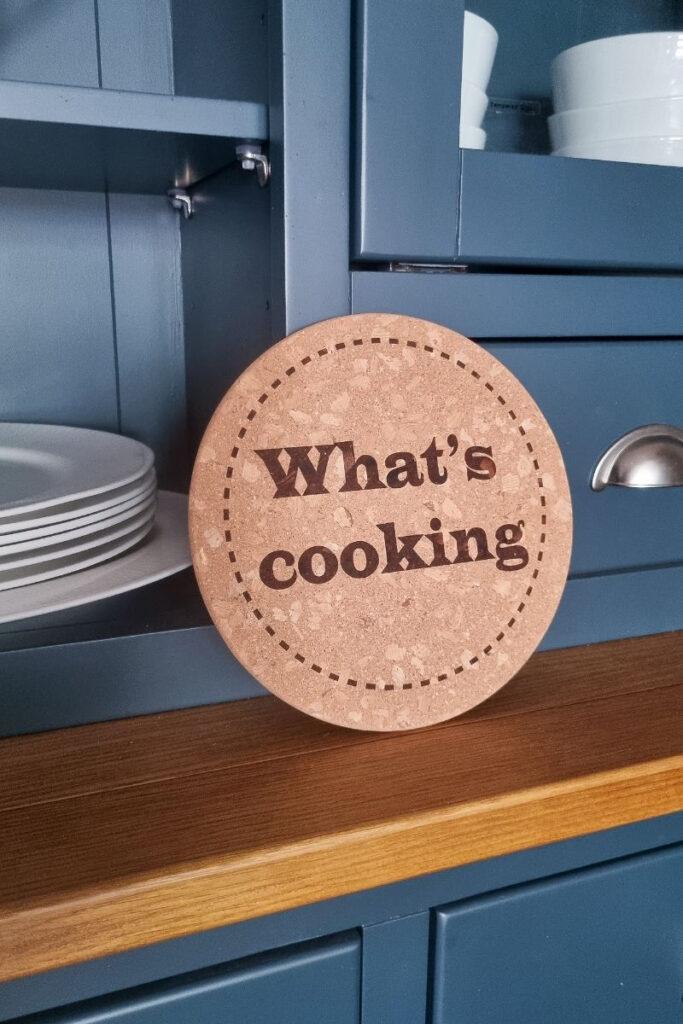
When creating your design, keep in mind the size and shape of your cork trivet. Simple, bold designs often work best for cork due to its granular texture. You can create your design using graphic design software such as adobe illustrator or Inkscape for a free version, then import it as an svg, into the software that comes with your laser cutter. Alternativly if you don’t want to design your own, head to the bottom of this post to download my free ‘hot stuff’ and ‘what’s cooking’ svg files.
Engraving your design
Once your design is ready and your settings are adjusted, it’s time to start engraving. Monitor the process to ensure everything is going smoothly. If you notice the engraving is too light, you can pause the machine and adjust the settings. Never leave your laser unattended as materials like cork can ignite easily.
Post-engraving care
After engraving, gently clean the cork to remove any residue from the engraving process. Avoid scrubbing or using harsh chemicals as they can damage the cork and the engraving.
Exclusive SVGs for your kitchen!
To help you get started with your cork engraving projects, consider signing up for our exclusive SVGs ‘Hot Stuff’ and ‘What’s Cooking’. These designs are perfect for engraving on cork trivets, adding a personal touch to your kitchen.
Laser engraving cork is a fun and rewarding craft. With a bit of practice and the right settings, you can create beautiful and functional pieces for your home. So, why wait? Start exploring the world of laser engraving today!
free download